
SPF, DKIM, and DMARC — Complete Email Authentication Guide
Why one protocol isn't enough
SPF, DKIM, and DMARC form three layers of email authentication. Each solves a different problem — and none provides complete protection on its own.
- SPF verifies that an email was sent from a server authorized for the domain. It doesn't validate the message content or the "From" header address the recipient sees.
- DKIM cryptographically signs the message and verifies it wasn't altered in transit. It doesn't specify what to do when the signature is missing or fails.
- DMARC ties SPF and DKIM results to the domain in the "From" header (alignment) and defines a policy — what the recipient should do with unauthenticated email.
Without DMARC, SPF and DKIM can fail and the recipient may still deliver the email. Without SPF and DKIM, DMARC has nothing to evaluate. Only together do they form a complete chain: server authorization → message integrity → policy and reporting.
How the three protocols work together
The entire authentication process happens when the receiving server processes an incoming email:
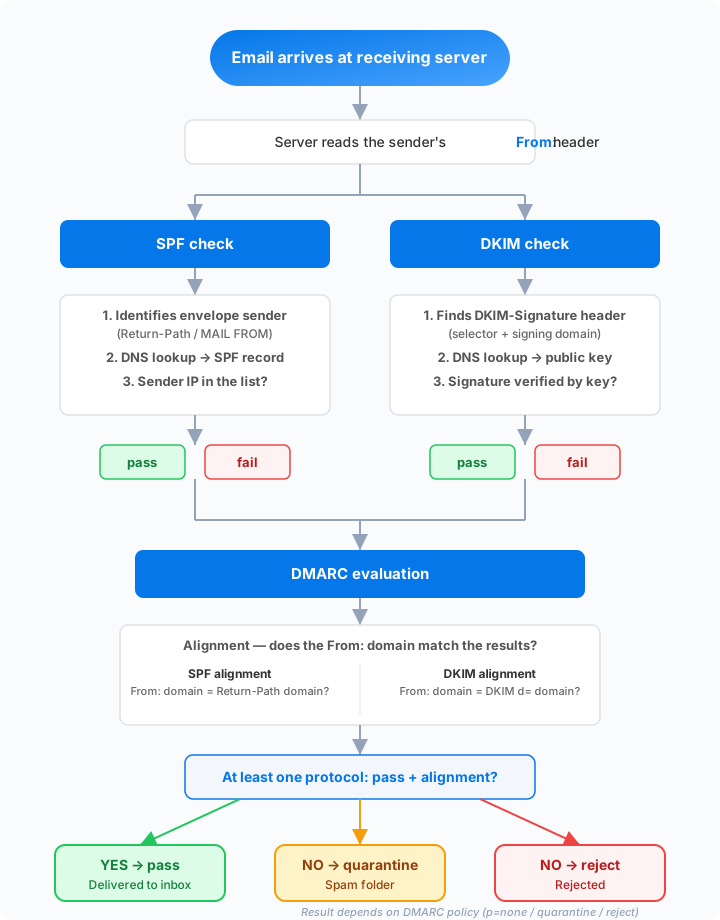
- SPF check — the server verifies whether the sender's IP address matches the SPF record of the domain from the envelope (envelope sender).
- DKIM check — the server verifies the cryptographic signature in the message header against the public key in the DNS of the signing domain.
- DMARC evaluation — the server checks whether the domain from the successful SPF or DKIM check matches the domain in the "From" header (alignment). If it does, DMARC passes. If not, the DMARC policy applies —
none,quarantine, orreject.
The key concept: alignment
SPF checks the domain from the email envelope (envelope sender), while DKIM checks the domain that signed the message. Neither has to match the domain in the "From" header — the address the recipient actually sees.
DMARC solves this problem. It requires that at least one protocol (SPF or DKIM) passes and that the domain from the successful check matches the "From" header domain. Without alignment, an attacker could send an email from their own server (with valid SPF for their domain) but with a spoofed "From" address of your company.
DMARC distinguishes two alignment modes: relaxed (default) requires organizational domain match — news.example.com satisfies alignment for example.com. Strict requires an exact domain match. Relaxed alignment is sufficient for most organizations.
What each protocol verifies
| Protocol | What it checks | What it protects against | What it doesn't cover |
|---|---|---|---|
| SPF | Sending server authorization (IP) | Unauthorized servers sending on behalf of your domain | From header spoofing, content integrity |
| DKIM | Message integrity and origin (signature) | Message tampering in transit | Policy for failures, unauthorized servers |
| DMARC | Alignment + policy + reporting | Spoofing of the From header, lack of policy | Needs SPF and/or DKIM as input |
Detailed protocol comparison
| Property | SPF | DKIM | DMARC |
|---|---|---|---|
| What it checks | IP address of the sending server | Cryptographic signature of the message | Domain alignment + policy |
| DNS record type | TXT (v=spf1 ...) |
TXT (v=DKIM1; ...) |
TXT (v=DMARC1; ...) |
| DNS location | example.com |
selector._domainkey.example.com |
_dmarc.example.com |
| Where the result is visible | Authentication-Results header |
Authentication-Results header |
Authentication-Results header |
| Survives forwarding | No — IP changes | Usually yes — signature remains | Depends on SPF and DKIM |
| Works standalone | Partially — no policy | Partially — no policy | No — needs SPF and/or DKIM |
| RFC specification | RFC 7208 | RFC 6376 | RFC 7489 |
Correct deployment order
Deploying all three protocols has a logical sequence. Skipping steps leads to deliverability problems.
1. SPF — authorize your sending servers
Start by listing all services that send email on behalf of your domain: your own mail server, Google Workspace, Microsoft 365, marketing platforms, helpdesk, billing systems. Publish an SPF record that includes them all:
v=spf1 include:_spf.google.com include:mail.zendesk.com ip4:203.0.113.10 -all
Check your SPF record with our analyzer — it validates syntax, DNS lookup count (limit is 10), and include mechanism validity.
2. DKIM — enable signing
For each sending service, enable DKIM signing with your domain. The service generates a key pair — you publish the public key as a CNAME or TXT record in DNS:
selector._domainkey.example.com CNAME selector.service.com
Verify your DKIM record for each selector you use.
3. DMARC — add policy and reporting
Only when SPF and DKIM are working, publish a DMARC record. Start in monitoring mode:
_dmarc.example.com TXT "v=DMARC1; p=none; rua=mailto:example.com@rua.spfmonitor.com"
The address example.com@rua.spfmonitor.com routes DMARC reports to SPF Monitor, which automatically processes and visualizes them. Analyze the data for several weeks — identify all legitimate senders and fix any issues.
Then gradually tighten the policy: p=quarantine → p=reject.
Requirements from major providers
Since 2024, Google and Yahoo require email authentication from all senders. Microsoft (Outlook.com, Hotmail) joined in May 2025. The rules vary by sending volume:
All senders
- Valid SPF or DKIM record
- Valid forward and reverse DNS for sending IPs
Bulk senders (over 5,000 messages per day)
- SPF and DKIM and DMARC (at least
p=none) - Alignment of the "From" header domain with SPF or DKIM domain
- Easy one-click unsubscribe
- Spam complaint rate below 0.3%
Failing to meet these requirements means deliverability problems — emails end up in spam or get rejected.
Common mistakes when combining protocols
Missing service in SPF record
When you forget to include a sending service in SPF, its emails may pass DKIM (if the service signs them) but SPF fails. If the service doesn't sign with your domain via DKIM, the entire DMARC check fails and with a quarantine or reject policy, emails won't be delivered.
Solution: Before tightening your DMARC policy, review DMARC reports — they reveal all email sources failing SPF or DKIM.
SPF exceeding the 10 DNS lookup limit
Every include, a, mx, and redirect mechanism in an SPF record requires a DNS lookup. The limit is 10 — exceeding it returns a PermError and the entire check fails.
Solution: Consolidate include mechanisms, replace a and mx with direct IP addresses where possible. SPF Monitor shows your current lookup count.
DKIM signing with a third-party domain
Some third-party services sign emails with their own domain instead of yours. The DKIM check passes, but alignment with the "From" header domain fails — and DMARC doesn't approve.
Solution: In the service settings, enable DKIM signing with your domain (custom DKIM domain).
Forwarding breaks SPF
When email is forwarded, the sending server changes. The new server isn't in the original domain's SPF record, so SPF fails. DKIM signatures typically survive forwarding (as long as the message body isn't modified), so DMARC can pass via DKIM.
This is why having working DKIM is important — it serves as a fallback when SPF fails. The ARC protocol helps preserve authentication results across the forwarding chain.
Practical checklist
Before tightening DMARC to p=reject, verify:
- SPF: Record includes all authorized senders, doesn't exceed 10 DNS lookups, ends with
-all - DKIM: Every sending service signs with your domain, public keys are in DNS
- DMARC reports: You've analyzed at least 2–4 weeks of data from
p=none, no legitimate traffic is failing - Alignment: Domain in envelope sender (SPF) and signing domain (DKIM) match the "From" header domain
- Subdomains: The
sp=rejecttag in your DMARC record also protects subdomains you don't send from
Run a complete analysis of your domain — it checks SPF, DKIM, and DMARC at once and shows where you have gaps.
What happens when you don't have DMARC
Without a DMARC policy, anyone can send an email with your domain in the "From" header — and the recipient has no way to verify it isn't legitimate. Consider a concrete scenario:
- An attacker discovers your domain — all they need to do is visit your company website. Your domain is public information.
- They send phishing to your customers — the email looks like an invoice or a payment reminder from your company. The "From" field shows your domain, the signature contains your name and logo.
- Without DMARC, the recipient has no policy — even if SPF fails (the attacker sends from their own server), the receiving server has no instruction to reject the email. The message lands in the inbox.
- Customers fall for it — they click a link, enter their login credentials, or pay to a fraudulent account.
- Your domain suffers — recipients start marking emails from your domain as spam. Your sender reputation drops, legitimate emails end up in spam. Recovering reputation takes months.
With a DMARC policy of p=reject, the receiving server would reject the attacker's email outright — the customer would never see it. This is why DMARC isn't just a technical detail but a protection for your brand and your customers.
Common myths about email authentication
Myth 1: "SPF prevents spam"
SPF doesn't filter spam. SPF only verifies whether the sending server is authorized to send email on behalf of a domain. A spammer with their own domain and a valid SPF record passes SPF checks without issue. Spam protection requires other tools — reputation filters, content analysis, machine learning.
Myth 2: "DKIM encrypts emails"
DKIM performs no encryption. The email content remains readable to anyone who intercepts it. DKIM only signs the message — it verifies that the content wasn't altered in transit and that the signature comes from an authorized domain. For email encryption, different technologies like S/MIME or PGP are needed.
Myth 3: "SPF alone is enough"
SPF on its own doesn't protect the "From" header that the recipient sees. An attacker can send an email with a spoofed "From" address and SPF won't catch it, because SPF checks the envelope sender, not the "From" header. Without DKIM, there's no integrity verification, and without DMARC, there's no policy — the recipient doesn't know what to do with unauthenticated email.
Myth 4: "DMARC p=none protects me"
The p=none policy only monitors — it doesn't block any emails. Receiving servers deliver even emails that fail the DMARC check. The p=none mode is an important first step because it allows you to collect DMARC reports and identify issues. But real protection against spoofing only comes with a policy of p=quarantine or p=reject.
Myth 5: "SPF checks the From address"
SPF checks the domain from the envelope sender (MAIL FROM in the SMTP conversation), not the "From" header that the recipient sees in their email client. These are two different addresses and they can differ. This is precisely why DMARC exists — it links the SPF (or DKIM) result to the "From" header domain through alignment.
Myth 6: "DKIM alone prevents spoofing"
DKIM verifies a signature — if one is present and valid. But DKIM doesn't specify what should happen when the signature is missing. Without DMARC, an attacker can send an email with no DKIM signature at all and the recipient may still deliver it. DMARC adds the missing layer: a policy that determines how to handle emails without valid authentication.
Email authentication adoption in practice
DMARC adoption is growing globally, but significant gaps remain. According to data from leading DMARC monitoring providers:
- The majority of Fortune 500 companies now use DMARC with a
p=rejectorp=quarantinepolicy. Large enterprises understand the risk of spoofing and actively protect their domains. - Millions of domains globally have a published DMARC record, but a significant portion remains on
p=none— monitoring only, without active protection. - Since 2024, Google and Yahoo require DMARC from bulk senders, which has significantly accelerated adoption. Microsoft joined in 2025 with similar requirements for Outlook.com and Hotmail.
Domains without DMARC are at a disadvantage today — not just in terms of security, but also deliverability. If you don't have DMARC yet, start with p=none and begin collecting data.
What comes after SPF, DKIM, and DMARC
SPF, DKIM, and DMARC are the foundation — but email security continues to evolve. After deploying all three protocols, consider additional layers:
BIMI (Brand Indicators for Message Identification) — allows you to display your company logo directly in the recipient's inbox. It requires DMARC with a policy of p=quarantine or p=reject. Visual identification strengthens recipient trust and distinguishes your legitimate emails from forgeries.
MTA-STS and TLS-RPT — MTA-STS (Mail Transfer Agent Strict Transport Security) enforces encrypted email delivery over TLS. TLS-RPT provides reports on TLS connection failures. Together, they prevent man-in-the-middle attacks and downgrade attacks on SMTP.
ARC (Authenticated Received Chain) — preserves authentication results across the forwarding chain. When an intermediary (mailing list, forwarder) forwards an email, ARC allows the recipient to verify the original authentication even when SPF fails due to the sending server change.
Complete deployment of all protocols — from SPF through DMARC to BIMI — creates multi-layered protection that safeguards your domain, your customers, and your brand.
Summary
SPF, DKIM, and DMARC aren't three independent technologies — they're three layers of one system. SPF authorizes servers, DKIM verifies integrity, DMARC enforces policy and provides feedback. Deploy them in this order, monitor reports, and gradually tighten your policy. Full deployment of all three protocols significantly improves your sender reputation and email deliverability.


